
Data demands continue to rise for sustainable businesses. You handle more analytics, customer portals, and AI tools every year. Pick the wrong setup, and costs pile up from power draw and forced upgrades.
Downtime kills momentum, too. Providers offering support for a wide selection of operating system providers let you match the right one to your exact needs. You stay ahead on net-zero pledges while dodging single points of failure.
Key Factors for Selection
You start by matching the OS to your reality. No guesswork, just facts:
- Needs Assessment: What server do you have in mind? Web hosting needs quick response times for traffic spikes. App hosting calls for steady uptime around the clock. Databases demand fast queries on big datasets. File storage requires reliable backups across drives. Virtualization lets one box run several jobs at once. Gaming dedicated servers handle low latency for players worldwide. Pin down your main use first.
- Performance & Stability: Linux often excels for high-traffic sites or resource-heavy tasks. It multitasks without breaking a sweat. Windows shines for Microsoft-centric apps where integration matters most. Look at benchmarks for your hardware.
- Security: Strong security features top the list. Regular updates patch holes fast. A solid track record means fewer breaches. Linux kernels get community fixes daily. Windows pushes monthly patches through its update system.
- Software Compatibility: Does your software run best on Windows for Microsoft stacks like .NET or Active Directory? Or Linux for open-source setups such as LAMP (Linux, Apache, MySQL, PHP)? Check your apps’ docs. Mismatches waste time and money.
- Cost: Most Linux distributions come free. No licenses needed. Windows Server adds fees, depending on the edition. Factor total ownership over three years.
- Support: Linux boasts huge communities on forums like Stack Exchange or Reddit. Windows delivers official Microsoft helpdesks. Red Hat Enterprise Linux offers paid tiers for businesses. Pick based on your team’s bandwidth.
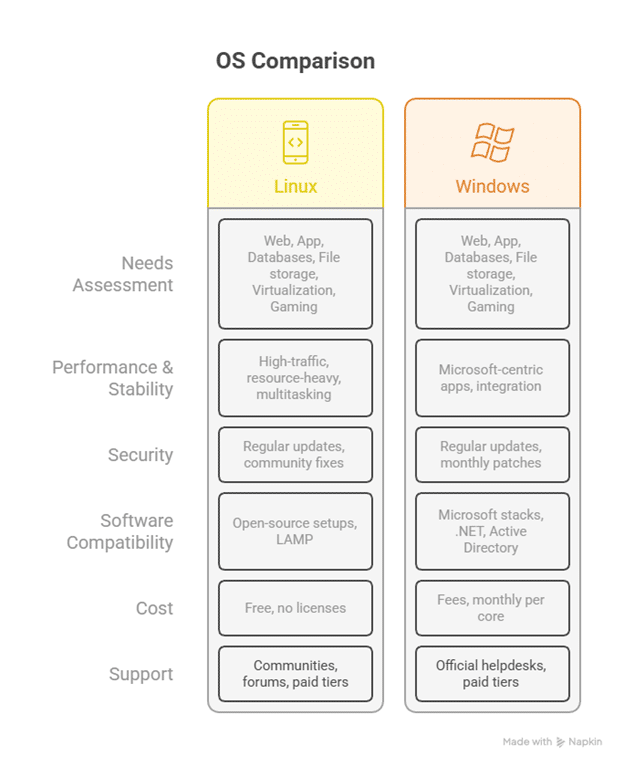
Break these down further. For web hosting, test load times under 100 concurrent users. Databases? Query speeds below 50 milliseconds. Write it out. Your list guides everything.
Common Operating Systems & Use Cases
You face real choices. Here they stand, with fits for your setup:
Linux-Based
Ubuntu Server draws newcomers and pros alike, installs in minutes, and runs web apps like WordPress or e-commerce platforms without hiccups.
CentOS Stream suits enterprise tools with frequent updates.
AlmaLinux mirrors older CentOS for long-term projects.
Debian prioritizes stability – perfect for databases that run months without restarts.
Rocky Linux fills the same gap with corporate backing.
They all power dedicated servers across industries. On a dedicated server USA setup, they handle East Coast traffic bursts from New York traders or California e-tailers.
Windows
Windows Server fits shops deep in the Microsoft ecosystem. Host SQL databases with easy scaling. Run .NET web services for internal tools. The graphical interface speeds management for GUI fans. Licensing adds up, though – CALs for users, extra for remote desktop.
It thrives in American Dedicated Server Hosting environments. Think compliance-heavy finance firms in Chicago or legal databases in D.C. Teams switch from desktops without retraining.
Specialized OS
TrueNAS turns boxes into storage powerhouses.
ZFS snapshots guard data against bit rot. Ideal for file shares in creative agencies.
Proxmox virtualizes full environments (VMs for testing, containers for apps).
Unraid pools odd drives into RAID-like arrays. It’s great for media libraries or backups.
Quick comparison: Linux covers 80% of web servers. Windows owns Microsoft niches. Specialized ones solve storage headaches.
Making the Most of Your Options
You hold the power with good providers. Use it. Start with Linux if you sit on the fence. Ubuntu Server packs unmatched flexibility. Vast package repos mean tools for any job – monitoring, firewalls, backups. It teaches as you build general-purpose setups.
Test, test, test. Fire up virtual machines on your laptop with VirtualBox or cloud trials from Linode. Push 500 users through Apache benchmarks. Time database inserts. Spot crashes early. Full deployment skips surprises.
Consider your team. Linux leans on command-line wizards (`apt update` and `systemctl` fly fast for experts). Windows offers point-and-click for juniors. Match skills to save headaches. Plan for growth.
Energy Efficiency Imperative
Power bills sting data centers. One rack guzzles as much as five homes yearly. Linux trims that fat.
And benchmarks prove it. Linux handles three times more web requests per RAM gigabyte than Windows. Idle pulls drop to 80-100 watts on Intel Xeons.
Install `powertop` on Ubuntu. Auto-set CPU governors to “powersave.” Disable unused modules and see servers rest lighter between peaks.
Server Resilience Lessons
Supply chains survive as long as their suppliers show up. When server patches fail, vendors pivot.
Server OS diversity rules. Wide open-source operating system support avoids lock-in. One distro lags? Swap to AlmaLinux overnight. Linux communities ship fixes in hours. Windows? Monthly cycles work if planned.
Test failover for stability and pilot dual-OS stacks to match supplier backups. Gear for trouble by picking setups with large communities for quick fixes.
Selection Framework
Nail this five-step path. You get results that last. Follow it closely, and your server setup pays off year after year.
Step 1: Audit Workloads
Start with a full list of what runs on your server. Web apps? Databases? File shares? Break it down. Grab a spreadsheet and note every app’s needs (RAM in gigs, CPU cores, IOps). For example, a WordPress site might need 2GB RAM and light CPU for 1,000 daily visitors.
Mismatched specs lead to crashes or overspending. Export your current server’s logs from tools like `top` or AWS CloudWatch. Rank apps by priority. This sheet becomes your roadmap, and time spent here saves weeks later.
Step 2: Scout Providers
Hunt for hosts that give you room to choose. Demand support for a wide selection of operating systems. Top USA dedicated server lists from OVH, Hetzner or Atlantic.Net offer 20-plus options right off the bat.
Filter for cPanel-ready Linux distros if you run sites. Check their panels – does one-click install cover Ubuntu, Debian, AlmaLinux? Look at uptime SLAs above 99.9%.
Step 3: Test in Staging
Spin up trials now. Most providers give 24-48-hour test accounts. Run stress tests with `sysbench` for CPU math or disk writes. Note boot times, too – Linux flavors clock under two minutes. Fail a test? Swap OS images same day. Document everything in your spreadsheet.
Step 4: Calculate ROI
Linux zeros out licenses. Save up to $5,000 in licensing avoidance over 3 years versus Windows. Windows Server adds $6,000 in fees for standard edition.
Factor carbon with Green Algorithms tools – one server swap drops 2 tons CO2 yearly. Use online calculators from Electric Power Research Institute for local rates.
Spreadsheet it: Columns for costs, savings, payback months. Under 12 months? Green light. This math convinces bosses or stakeholders every time.
Step 5: Deploy and Monitor
Go live small. Migrate one app first. Image your old setup with Clonezilla. Boot the new OS, restore data. Tweak weekly first month, backup configs to Git, and review logs monthly. This keeps surprises away.
Repeat yearly – Tech shifts fast – new kernels, chip architectures. Re-audit in Q4 and stay nimble.
Conclusion
Smart OS picks deliver real wins. Bills shrink by thousands. Uptime soars past 99.99%. You crush 2026 sustainability marks with lower power and longer gear life. Audit your stack today and grill providers on OS options. Then, test Ubuntu on a USA dedicated server trial. You can stack savings quickly, as you will see in the first month.