Downtime on an HDD (horizontal directional drilling) job is expensive, but guesswork costs more. Most “failures” are not burned boards. They’re low power, dirty contacts, interference, or a transmitter that’s one battery swap away from behaving again.
This guide is written for U.S. HDD contractors who need fast, repeatable decisions in tracking the drill head’s depth, pitch, roll, and position, communicating steering information to the drill operator, avoiding utilities and staying on the bore path to keep the job running safely and efficiently
You’ll get a clear split between what you can handle on site and what should go straight to a service bench. The goal is simple: restore reliable locating, protect seals and warranty, and keep the bore moving.
One rule stays true: if a fix requires opening a housing, breaking seals, or probing electronics, it is not a field fix. It’s a service job.
Quick Triage: Field Fix or Service Ticket
You can save an hour by deciding in the first minute. Use this triage before you change settings or blame a component.
Start with five checks that do not require tools:
- Check for moisture signs. Fog under a screen, water in a battery bay, or a musty smell means stop. Dry the outside, pull power, and plan for service.
- Check for heat or odor. If the unit runs unusually hot or smells burned, do not keep cycling power. Heat plus cycling can turn a small fault into a dead unit.
- Swap to known-good power. Replace batteries with a fresh, matched set or a reserved test pack. Do not “top off” a questionable set and hope.
- Move to a clean test spot. Step away from rebar, trench plates, vehicles, and overhead power. Retest at short range with simple geometry.
- Do one isolation swap. If you have a spare transmitter or receiver, swap only one piece and retest. If the symptom moves with the part, you’ve found the likely culprit.
Stop immediately and send it in if any of these are true: moisture inside, burn smell, repeated shutdowns on known-good power, cracked housing, or unstable readings that persist in a clean test spot. When those flags show up, more field testing usually increases damage.
What’s in a DigiTrak F5 Setup
A locating “system” is a chain. When the chain fails, crews often blame the wrong link because the symptom shows up at the receiver first.
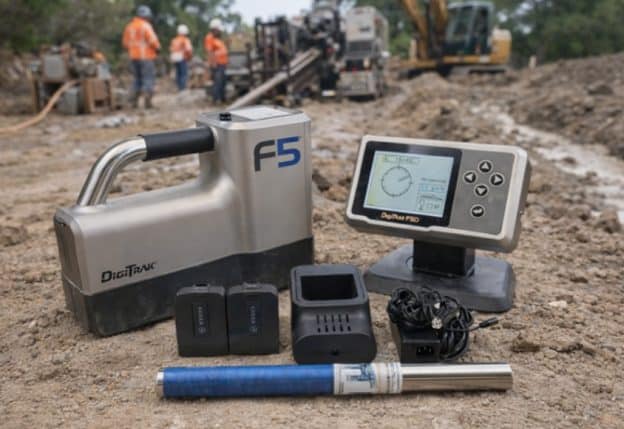
Most setups include a receiver, a transmitter, and the power that keeps both stable. The small parts matter too: battery contacts, caps, charging gear, and the case that protects the face and seals. A weak spring contact can mimic a dead unit. A cap that does not seat smoothly can allow intermittent power loss. A cheap battery can look fine at rest, then collapse under load and cause resets that feel random.
Think in terms of roles:
- The receiver measures the field and turns it into guidance you can trust.
- The transmitter creates the signal and reports orientation data through that signal.
- Power makes both honest. Bad power creates chaos that looks like a “mystery failure.”
That’s why good troubleshooting is mostly about isolation. You are not trying ten fixes. You’re proving what the problem is not. Once you do that, you can choose the right response: clean and continue, change location and continue, or stop and send it in.
Field-First Diagnostic Toolkit
You do not need a bench to troubleshoot well. You need a small kit and a routine you follow the same way every time.
Build your field kit around four categories.
Power: Keep a matched set of fresh batteries and one reserved “test set” that stays in the truck for diagnosis. If you use rechargeable packs, reserve one pack as your baseline. Its job is to answer one question: is this power-related or not.
Cleaning: Carry a dry microfiber cloth and a small amount of isopropyl alcohol for external contact cleaning. Focus on battery contacts and cap seating surfaces. Do not flood compartments. A light wipe is enough to remove film that causes voltage drop under vibration.
Isolation: Your best tool is a clean test spot and a short routine. Step away from metal and energized lines. Place the transmitter at a fixed distance and repeat the same measurement twice. Your goal is not perfect calibration in the field. Your goal is stable behavior.
Spare Plan: If your schedule is tight, a backup transmitter is often cheaper than one lost day. The moment you can swap one component and watch the symptom follow it, you stop guessing and start making confident decisions.
DigiTrak F5 Common Failures By Symptom: Field Fix vs. Service
Before you dive into symptoms, set one baseline for your DigiTrak F5 workflow: confirm fresh power, then retest in a clean spot. That two-step habit prevents you from diagnosing the jobsite instead of the equipment.
This section is designed for scanning. Each symptom follows the same pattern: what you see, what it usually means, what to try in five minutes, and when to stop.
Use one rule to stay sane: if the behavior changes dramatically when you move to a clean test spot, you are dealing with interference or site conditions. If it does not change, you are likely dealing with power path issues or hardware condition.
Keep notes. A two-line log helps: “fresh batteries, clean spot, result.” It prevents crews from repeating the same test and calling it progress.
Won’t Power On Or Random Shutdowns
Symptoms are obvious: the unit will not start, starts and dies, or reboots when you move or tilt it. It can look like software, but power is the first suspect.
Most causes are basic. Batteries can show decent voltage at rest and collapse under load. Dirty contacts can do the same thing. A cap that does not seat fully can break contact for a split second under vibration.
Do these checks in order:
- Swap to a known-good battery set or your reserved test pack.
- Inspect contacts for film, corrosion, or bent springs.
- Reseat the cap and confirm it tightens smoothly with no gritty feel.
- Retest while holding the unit steady, then while gently moving it.
Field fixes are simple: clean contacts, replace batteries, and retest. In cold weather, warm batteries in a pocket and keep spares warm.
Service-only stop signs: repeated shutdowns with known-good power, unusual heat, moisture signs, or a housing crack. If it still reboots after clean power and clean contacts, stop. Cycling power repeatedly can worsen internal damage.
DigiTrak Sonde F5 Weak Signal And Dropouts
Weak or intermittent signal is often blamed on the receiver, but the transmitter is frequently the real issue. That is why crews lose time chasing menus instead of swapping power.
Symptoms include dropouts during walkover, signal that fades quickly with depth, or a “no read” that appears suddenly after working fine earlier. The most common cause is low transmitter power, followed by wrong frequency choice or heavy interference.
Run this five-minute isolation:
- Replace transmitter batteries with a fresh, matched set.
- Confirm you are on the intended frequency option for the job.
- Move to a clean test spot and retest at short range.
- If available, swap in a spare transmitter and repeat the same test.
If the symptom disappears after a battery swap, it was power. If it disappears only after moving location, it was site noise. If it follows the transmitter in a clean spot, the transmitter is the suspect.
Service-only stop signs: consistently short range in clean conditions, repeatable dropouts on fresh batteries, or behavior that worsens over several days. That pattern points to internal issues that field steps cannot fix.
Unstable Depth Readings That Jump
Depth problems are high-risk because they can lead to bad decisions near utilities. Treat unstable depth as a “prove it” situation, not a “trust it” situation.
Symptoms include depth jumping several feet, readings that change with small receiver movement, or depth that looks fine until you approach steel, then goes wild. Most of the time, interference is the cause. Steel plates, rebar mats, rails, and energized lines distort the field.
Do these checks before you blame the equipment:
- Step away from obvious metal and retest in a clean area.
- Repeat the measurement twice from the same stance and receiver height.
- Try a different frequency option when job conditions allow.
- Compare results at short range to remove geometry errors.
Field fixes are mainly operational: reposition, slow down, and use redundant measurements. If the site is noisy, plan guidance points where geometry is clean and steel is farther away.
Service-only stop signs: depth instability that persists in a clean test spot, or unstable readings that appear alongside shutdowns or display glitches. If clean conditions don’t stabilize readings, service is the responsible path.
Pitch, Roll, Or Heading Drift
When orientation data drifts, the numbers feel personal. They aren’t. Orientation is sensitive to environment and to internal stability.
Symptoms include pitch or roll shifting when toolface has not changed, or heading that seems to “walk” over time. Some jobs show drift only near reinforced concrete, steel casings, or certain corridors.
Start with environment checks:
- Move away from large steel and retest.
- Let equipment stabilize to ambient temperature before judging drift.
- Use the manufacturer-approved calibration routine if your procedure allows it.
- Confirm drift by repeating the same setup twice, not by chasing it live.
Field fixes are mostly about conditions. Move guidance points away from steel when possible. Reduce nearby electrical noise sources if you can. Establish a clean baseline before the bore so you know what “normal” looks like that day.
Service-only stop signs: persistent drift in a clean test spot, especially after a drop or impact. If calibration does not improve repeatability, stop and send it in.
Display Or Keypad Problems
A screen glitch feels like a showstopper, but sometimes it’s only mud, moisture, or cold affecting responsiveness. The key is to stay non-invasive.
Symptoms include flicker, dim backlight, dead lines, or keys that do not respond consistently. Intermittent problems that disappear after warming up often point to temperature or contamination rather than a failed board.
Use gentle checks:
- Wipe the exterior and remove mud from seams and edges.
- Power cycle once, then test keys along a simple menu path.
- Look for fogging or moisture under the display window.
- Warm the unit gradually in cold conditions and retest.
Field fixes are limited to cleaning, drying the exterior, and protecting the face during transport. You cannot repair a membrane or display without opening the unit.
Service-only stop signs: visible moisture under the screen, cracked windows, or unresponsive keys after cleaning and drying. In those cases, the risk is not only usability. Moisture can migrate and damage internal electronics.
Battery Life Suddenly Drops
Short runtime is often a warning that your power path is compromised or your batteries are not performing under load.
Symptoms include batteries dying far earlier than normal, low battery alerts too soon, or performance that’s fine for a short window then drops out. Common causes include low-quality cells, cold weather, dirty contacts, or mixing old and new cells.
Run a controlled check:
- Use a fresh matched set from the same brand and batch.
- Clean contacts and reseat caps.
- Compare runtime behavior in moderate temperature versus cold.
- Swap to your reserved test set and repeat.
Field fixes are mostly discipline: matched cells, dry storage, no mixing, and warm spares in winter. If your days are long, plan power as part of operations, not as an afterthought.
Service-only stop signs: drain persists across multiple known-good sets, especially after the unit has been wet. That points to internal leakage or corrosion that needs service.
Water, Mud, Or Impact Event
This category turns manageable problems into expensive failures. The best field move after water exposure or a hard hit is often to stop.
Symptoms can be delayed. A unit may run for an hour, then begin to reboot, read erratically, or lose signal. Fogging can appear later, not immediately.
Your five-minute goal is containment:
- Power down and remove batteries or packs.
- Dry the exterior and battery area with a clean cloth.
- Avoid aggressive heat. Do not use heat guns or open flames.
- Do not run repeated test cycles. Cycling power can accelerate corrosion.
Field action should focus on documenting what happened and isolating the job impact. If you must keep drilling, use a spare component rather than forcing a compromised unit to finish the day.
Service-only stop signs: any internal moisture sign, a cap or housing crack, or new instability that persists after drying the exterior. Water and impact are not problems persistence solves.
Interference vs. Real Failure
Interference is the most common reason crews believe equipment is broken. It is also the hardest to recognize in the moment because it changes block by block.
Common jobsite sources include overhead power, buried power, rebar in sidewalks, steel trench plates, rails, reinforced vaults, vehicles parked close, and other electronic equipment running nearby. The pattern is consistent: as you approach conductive mass and strong current, the locating field becomes distorted and readings become less repeatable.
To keep your DigiTrak F5 checks honest, separate “site noise” from “equipment condition.” Move to a clean test spot, then retest at short range. If readings stabilize quickly, your equipment didn’t “heal.” The environment changed.
Use a repeatable interference playbook:
- Start the walkover away from steel, then approach slowly while watching stability.
- When job conditions allow, try a different frequency option and compare repeatability.
- Take two readings at the same point with the same stance and height. If the spread is large, treat the data as compromised.
- Plan guidance points where geometry is clean instead of forcing precision in the noisiest zone.
Important: interference management is not just technique. It’s planning. If your work is routinely in dense utility corridors, you need a stable process and gear in known condition so you can trust your baseline.
When It’s Definitely Service
Some symptoms are not puzzles. They are stop signs. Ignoring them usually makes the repair more expensive.
Treat these as service-only triggers:
- Moisture inside compartments or fog under the display window.
- Burn smell, scorching, or unusual heat during normal operation.
- Repeated reboots or shutdowns that persist with known-good power.
- Unstable readings in a clean test spot after you’ve confirmed fresh batteries and proper setup.
- Cracked housings, damaged caps, or impact events that changed behavior.
- Recurring corrosion that returns after light cleaning.
The reason is simple. Once seals are compromised, the clock starts. Corrosion does not pause because the bore is urgent. It accelerates with humidity and power cycles.
If a job must continue, use a spare rather than forcing a compromised unit. A controlled swap is safer than a heroic workaround. The best service decision is often the earliest one, because it prevents secondary damage.
If you’re managing a fleet, build a rule into your playbook: any unit that shows moisture, heat, or repeated power faults gets pulled immediately. That one rule prevents the “it worked yesterday” spiral that burns time and money.
Preventive Care That Reduces Failures
Preventive care is not a big maintenance day. It is small habits that keep the system predictable.
Use a weekly routine that takes about fifteen minutes:
- Inspect battery contacts and cap threads. Look for film, grit, and early corrosion.
- Clean exterior seams so mud does not dry into gasket areas.
- Run a short baseline check in a clean area. Repeat the same short-range test twice and confirm the numbers are stable.
- Store equipment dry and protected. Avoid stacking heavy items on the screen or face.
- Rotate batteries and keep one matched test set reserved for troubleshooting.
With a DigiTrak F5 setup, most “surprise failures” are really predictable patterns you missed early. A stable baseline test catches drifting behavior before it shows up over a live bore.
Build habits around your reality. If you work wet pits and heavy slurry, plan for extra drying and more careful storage. Water is not only a moment risk. It becomes a week risk when corrosion starts and behavior becomes unpredictable.
Predictability is the goal. Predictability is what makes a crew fast. A stable baseline also protects resale value. Clean compartments, intact caps, and repeatable performance make equipment easier to evaluate and easier to sell.
Buying DigiTrak F5 on UCG HDD
When you buy used locating equipment, you are not only buying a model name. You are buying condition, completeness, and confidence. That’s why the buying process should feel as structured as field troubleshooting.
Start with your job profile. Do you work in dense utility corridors with heavy interference, or long rural shots where range matters most? Do you need a backup transmitter to protect tight schedules? Those questions determine what “right setup” means.
If you want to see current sale options and price points for DigiTrak F5 equipment in one place, you can review the catalog here .
What you’ll find on that page: live listings, what’s included, and items that can help you replace a weak component fast without guessing.
FAQ
Can I troubleshoot without risking seals or warranty?
Yes, if you keep it non-invasive. Battery swaps, external cleaning, moving to a clean test area, and isolation swaps are safe. Opening a housing is not.
Why does depth look fine on one street and useless on the next?
Because interference changes block by block. Metal and current distort the field. A clean test spot is the fastest way to confirm the cause.
When should I stop trying field fixes?
Stop when you see moisture signs, heat or burn odor, repeated shutdowns on known-good power, or instability that persists in clean conditions. At that point you are risking bigger damage.
Is it worth keeping a spare transmitter?
Often, yes. One spare can turn a full-day delay into a ten-minute swap. It also lets you isolate problems quickly rather than guessing.
What should I check before buying used gear?
Check completeness, battery compartments, cap condition, and repeatability in a clean test area. Ask about warranty terms and confirm the configuration matches your work style.
How do I avoid buying the wrong configuration?
Describe your typical job sites and constraints, then match equipment to that reality. Frequency options and accessory choices matter, and a quick call can save time.
Conclusion
Field troubleshooting should be fast, repeatable, and non-invasive. Most problems you see on site come down to three categories: power, interference, or a component that needs isolation testing. When you use a clean test spot and a simple swap routine, you stop guessing and you start making confident calls.
For a DigiTrak F5 crew, the best results come from the same habits every day: a known-good power swap, a clean-spot check, and a hard stop when service flags show up. That approach protects seals, reduces downtime, and keeps decisions disciplined under pressure.
Service decisions matter just as much as field fixes. Moisture signs, burn odor, repeatable shutdowns on known-good power, and unstable readings that persist in clean conditions are not problems you win with persistence. They are problems you manage with discipline.
If your work depends on tight schedules, the smartest “repair” is often a tested backup plan. Whether you’re replacing a weak component or upgrading your setup, buying equipment in known condition reduces downtime and protects the next bore.