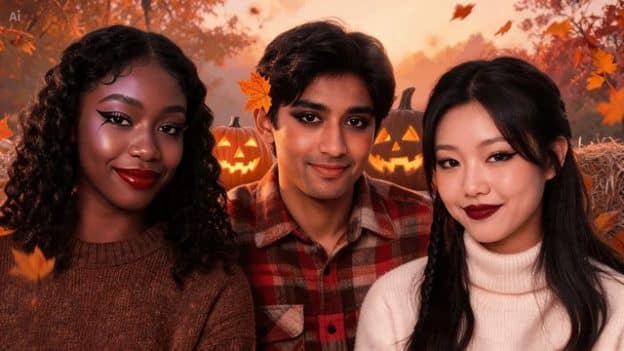
Halloween has always been a playground for costumes, dramatic makeup, eerie lighting, and over‑the‑top storytelling. Now, as more creators and brands rely on visual content to capture attention online, digital photo and video filters have become a powerful way to package that seasonal atmosphere. A single effect can turn an everyday portrait or short clip into something mysterious, playful, or spine‑tingling — and today’s tools make it possible even for people with zero editing experience.
For marketers, this shift is huge. Halloween filters aren’t just fun add‑ons; they’re engagement engines. They help brands tap into seasonal trends, boost shareability, and create timely content without a full production team. Modern editing platforms blend traditional visual effects with AI, making transformations faster, more customizable, and more accessible than ever.
What Actually Is a Halloween Filter?
A Halloween filter is a digital effect that gives a photo or video a seasonal look. Depending on the style, it might shift colors, adjust lighting, tweak facial details, alter the background, or layer in visual elements like fog, shadows, masks, glowing eyes, autumn tones, or costume-style details.
Some filters rely mostly on color grading—darker, cooler images with heavier contrast. Others use face detection or AI-based processing to add makeup, facial details, or themed accessories directly. Modern Halloween editing tools can also touch the surrounding environment, not just a person’s face.
That flexibility means the same underlying idea works across portraits, family photos, party pictures, short-form video, and creative projects alike.
How Digital Filters Actually Build That Spooky Feel
A good seasonal filter usually comes down to several small visual changes working together, not one dramatic switch. Color’s one of the biggest factors here. Orange, red, purple, blue, and muted gray tones can shift an image’s emotional feel almost instantly.
Lighting is also important. Deeper shadows add drama to a scene, and subtle highlights can lend a moonlit, even otherworldly feel. Some effects add glowing areas or simulated light sources to make an average photo feel much more cinematic.
Facial effects work a bit differently. Image-processing systems first identify areas like the eyes, cheeks, lips, and forehead, then place digital makeup or other details over them. That’s what lets an effect actually track facial movement convincingly when it’s applied to video.
AI and How Seasonal Effects Have Evolved
AI has made image editing a lot more adaptive. Instead of manually placing every single effect by hand, AI-powered tools can scan an image and figure out where specific changes should actually go.
An AI Halloween editing system, for instance, might recognize a face first, then layer on pale skin tones, dark makeup, or themed facial details. Other systems can identify the background separately and shift its atmosphere without touching the main subject.
This tech is also genuinely useful for experimenting. Users can compare a few visual directions before settling on what best fits a costume, event, or creative concept. Some online Halloween editing tools even offer previews, so you can check adjustments before locking in the final image.
Picking the Right Style for Your Content
Not every Halloween image needs to look terrifying. The right style really depends on who’s actually going to see it and why.
You may have better luck with a family photo with playful pumpkins, warm autumn colors, or light costume touches. A portrait for a horror-themed project likely needs deeper shadows, cooler tones, and more dramatic facial effects. Social content, by contrast, usually works best with a single, strong visual idea that still reads well on a tiny phone screen.
Creators exploring a halloween filter might want to think through whether they’re going for a subtle seasonal touch or a full transformation. Starting with the mood you want, rather than jumping straight to the effect, usually makes the editing process more purposeful.
Practical Tips for Better Results
The original image’s quality strongly affects the final result. Clear photos with good lighting simply give the editing system more to work with. For portraits, keeping the face reasonably visible helps facial effects line up a lot more accurately.
It also helps to not go overboard with effects. Stacking too many strong filters at once tends to make an image feel cluttered and dilutes the impact of each individual element. A simple background tweak paired with one strong facial or lighting effect usually beats piling on several unrelated changes at once.
For video, consistency matters even more. If the filter shifts dramatically frame to frame, it ends up looking distracting rather than intentional. Previewing the whole sequence — not just judging individual frames — helps catch unwanted transitions or inconsistencies before they become a problem.
Halloween Filters Beyond Just Selfies
Selfies get most of the attention, but seasonal filters can apply to much more. Interior photos can get a darker, more atmospheric look for party invitations or event announcements. Decoration photos can pick up extra lighting and color adjustments. Short videos can layer visual filters together with music, transitions, captions, and other editing tricks.
These tools lend themselves well to storytelling. The story could begin with a simple photograph, and the effects could become more dramatic as it progresses, showing a fictional metamorphosis. In this case, the filter isn’t just a decorative element – it is part of the story.
Worth Considering: Privacy and Authenticity
If you’re using AI-powered editing tools, it’s worth pausing for a moment to think about what images are actually being uploaded and how personal photos are being handled on the other end. It’s reasonable to check the privacy details and permissions of a service before inputting anything sensitive.
Also worth remembering: edited photos are creative representations, not necessarily an accurate depiction of reality. If images are to go out in the public eye, especially images of other people, being clear about any major digital edits can help to prevent awkward misunderstandings down the line.
Where Seasonal Photo Editing Is Headed
Halloween filters are a good example of how digital creativity is becoming more and more accessible. What once took esoteric software and painstaking manual editing can now increasingly be done with automated tools and smarter, more intelligent effects.
Seasonal editing for marketers will become more interactive, too, as image and video tech continues to improve. The next generation of tools could allow for more precise control of individual visual elements, more realistic changes to the environment, and more seamless effects applied to moving footage. The core idea is the same though – to use technology to communicate a mood, an idea, or a story through images.
For creators, the most effective move isn’t necessarily reaching for the most dramatic effect available. Picking the right style, starting from a strong original image, and applying changes with a bit of restraint tends to produce Halloween content that actually feels creative, coherent, and worth remembering.